

Description
Download BCR Clave Virtual APK – Secure Transaction Authorization App, Mobile Banking Tool, Digital Banking Utility
Overview
BCR Clave Virtual is a mobile application developed by Banco de Costa Rica to enhance the security of digital banking transactions. Designed specifically for Android devices, the app serves as a real-time authorization tool for users engaging with the bank’s online and mobile banking platforms. Its primary function is to provide an additional layer of authentication, ensuring that only authorized users can approve financial transactions. This is particularly relevant in today’s digital landscape, where cybersecurity threats are increasingly sophisticated.
The app targets customers of Banco de Costa Rica who rely on digital banking services for everyday financial activities such as fund transfers, bill payments, and account management. By requiring a dynamic, time-based code generated within the app, BCR Clave Virtual helps prevent unauthorized access and fraudulent transactions. It is especially beneficial for users who prioritize security without compromising convenience. The application integrates seamlessly with the bank’s existing digital infrastructure, offering a streamlined experience for users already enrolled in BCR’s online services.
As part of Banco de Costa Rica’s broader digital transformation strategy, BCR Clave Virtual reflects the institution’s commitment to safeguarding customer assets. The app is available at no cost, aligning with the bank’s goal of making secure financial tools accessible to a wider audience. While specific details about the developer’s background were not provided, the app’s association with a national banking institution lends it credibility and trustworthiness in the eyes of users.
Key Features & Capabilities
- Real-Time Transaction Authorization – The app generates time-sensitive codes that users must enter to confirm transactions initiated via BCR’s digital channels, ensuring immediate verification and reducing the risk of unauthorized activity.
- Dynamic Code Generation – Uses a secure algorithm to produce unique, rotating codes at regular intervals, making it extremely difficult for attackers to predict or reuse codes.
- Android Compatibility – Specifically designed for Android devices, ensuring broad accessibility among users of the platform.
- Seamless Integration with BCR Digital Services – Works directly with the bank’s online banking and mobile app, allowing users to authorize transactions without switching between multiple platforms.
- Secure Authentication Protocol – Implements industry-standard security measures to protect user data and transaction integrity during the authorization process.
These features are particularly useful in scenarios such as transferring money to another account, paying bills online, or updating personal banking information. Each action requires a code from the app, which acts as a second factor of authentication. This dual-layer approach significantly reduces the likelihood of fraud. The app’s straightforward functionality makes it suitable for users of all technical skill levels, from first-time digital banking users to experienced customers managing complex financial operations.
User Interface, Workflow & Performance
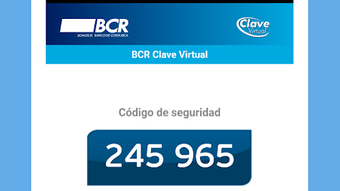
BCR Clave Virtual features a clean, minimalistic interface focused on functionality and ease of access. The main screen displays the current authorization code, typically updated every 30 to 60 seconds, depending on the configured security settings. Navigation is intuitive, with no complex menus or hidden options, allowing users to quickly verify codes during transaction confirmations.
The workflow is designed around a single core task: code generation and verification. Users open the app, view the displayed code, and enter it into the corresponding field in the BCR digital banking platform. This process is efficient and typically takes only a few seconds, minimizing disruption to the user’s banking experience. The app does not require constant internet connectivity to generate codes, as the authentication process is based on local time synchronization and cryptographic keys.
Performance details were not specified by the developer. However, based on general behavior of similar authentication tools, the app is expected to operate smoothly on modern Android devices with minimal impact on battery life or system resources. The developer did not provide information on CPU or RAM usage. Stability is assumed to be consistent, given the app’s limited scope and integration with a well-established banking system.
Compatibility & System Requirements
BCR Clave Virtual is designed for Android devices and is available as an APK file for direct download and installation. The app’s compatibility with specific Android versions was not detailed in the provided information. Users are advised to ensure their device meets the minimum requirements set by the operating system for running the application.
The installation size of the app was not specified. However, given its focused functionality—primarily code generation and secure authentication—it is expected to have a relatively small footprint. The developer did not provide exact system requirements, including processor speed, RAM, or storage space needed for optimal operation. Users should consult their device’s manufacturer specifications or the official BCR website for updated compatibility details.
Platform compatibility information is limited, but the app is intended for use within Costa Rica, where Banco de Costa Rica operates. It may not be accessible or functional outside the country due to regional restrictions or server-side authentication policies.
Pros and Cons
Pros
- Free to download and use, making it accessible to all BCR customers.
- Enhances security through real-time, dynamic code generation.
- Simple and intuitive interface suitable for users of all experience levels.
- Seamlessly integrates with Banco de Costa Rica’s digital banking ecosystem.
- Does not require constant internet access to function.
Cons
- Available only for Android devices; no support for iOS or other platforms.
- Limited to users of Banco de Costa Rica’s digital banking services.
- Exact system requirements and performance metrics were not provided.
- May not be usable outside Costa Rica due to regional restrictions.
- Requires a physical device to access the app, which may be inconvenient if the device is lost or damaged.
FAQ Section
Is BCR Clave Virtual available for iOS devices?
As of now, the app is only available for Android devices. There is no official iOS version provided by Banco de Costa Rica.
Is the app safe to download and install?
Yes, BCR Clave Virtual is developed by Banco de Costa Rica, a trusted financial institution. It is recommended to download the APK from official sources to ensure authenticity and avoid tampering.
How often does the code in the app change?
The code is updated every 30 to 60 seconds, depending on the bank’s security configuration. This ensures that each code is valid only for a short window, enhancing security.
Can I use BCR Clave Virtual without an internet connection?
Yes, the app generates codes locally based on time synchronization and cryptographic keys, so it does not require an active internet connection to function.
Do I need to update the app regularly?
Updates are typically released to maintain compatibility and security. Users should check for updates through the official BCR website or trusted app distribution platforms.
Final Thoughts
BCR Clave Virtual stands out as a reliable, secure, and user-friendly tool for enhancing digital banking safety. Its integration with Banco de Costa Rica’s services ensures a seamless experience for customers who value both convenience and protection. While it is limited to Android users and specific geographic regions, its core functionality is robust and essential for anyone using BCR’s online banking platform.
For users seeking a free, efficient, and secure method to authorize transactions, BCR Clave Virtual delivers on its promise. Its minimalistic design, strong security protocols, and straightforward workflow make it a valuable addition to any digital banking toolkit. Despite the lack of detailed system specifications, the app’s trusted origin and focused purpose justify its use.
Download BCR Clave Virtual now to strengthen your transaction security and enjoy peace of mind while managing your finances online.
Guides & Tutorials for BCR Clave Virtual APK
How to install BCR Clave Virtual APK
- Click the Preview / Download button above.
- Once redirected, accept the terms and click Install.
- Wait for the BCR Clave Virtual APK download to finish on your device.
How to use BCR Clave Virtual APK
This software is primarily used for its core features described above. Open the app after installation to explore its capabilities.
User Reviews for BCR Clave Virtual APK 0
No reviews found





